

What is Aithor.io
Aithor.io is a web app for university students that helps you write academic papers step by step, with real sources you can check, research your topic and revise from your own notes. Works in the browser on a computer or phone, at dashboard.aithor.io: nothing to install. The free plan is a trial: its quotas do not renew.
| Interface in 9 languages: Spanish, English, Portuguese, French, Russian, Turkish, Arabic, Indonesian and Hindi |
| Cites real academic sources from OpenAlex and Crossref |
| 10,851 citation styles (APA 7, MLA, Chicago, Harvard, IEEE, Vancouver, AMA, ABNT…) |
| 8 tools: Quiz, Open questions, Flashcards, Concept map, Infographic, Presentation, Podcast and Video |
| One paid plan, Aithor Pro, with no lock-in: cancel anytime |
| The free plan is a trial: its quotas do not renew |
Who runs Aithor.io
Aithor.io is run by Chatbot App Limited, the company named as data controller in our privacy policy. Company details and ways to reach the team are on the About page.
The pages on this site are written and reviewed by the Aithor.io team. Our editorial policy explains how we pick topics, where AI helps with drafts and how we check sources before anything goes live.
What you can do with it
Aithor.io puts several academic tools behind one account. Each one fits a different point in your semester:
| When you need to… | Use | What you get |
|---|---|---|
| Write an essay, report or dissertation | Guided writing | A document with a title, outline, sections and citations to real sources |
| Write a literature review | Literature review | Inclusion criteria, a table of studies and a comparison matrix |
| Find papers on your topic | Investigator | A cited answer, the level of agreement between studies and open research gaps |
| Revise for an exam | Study | Quizzes, flashcards, concept maps and more, built from your own material |
Writing
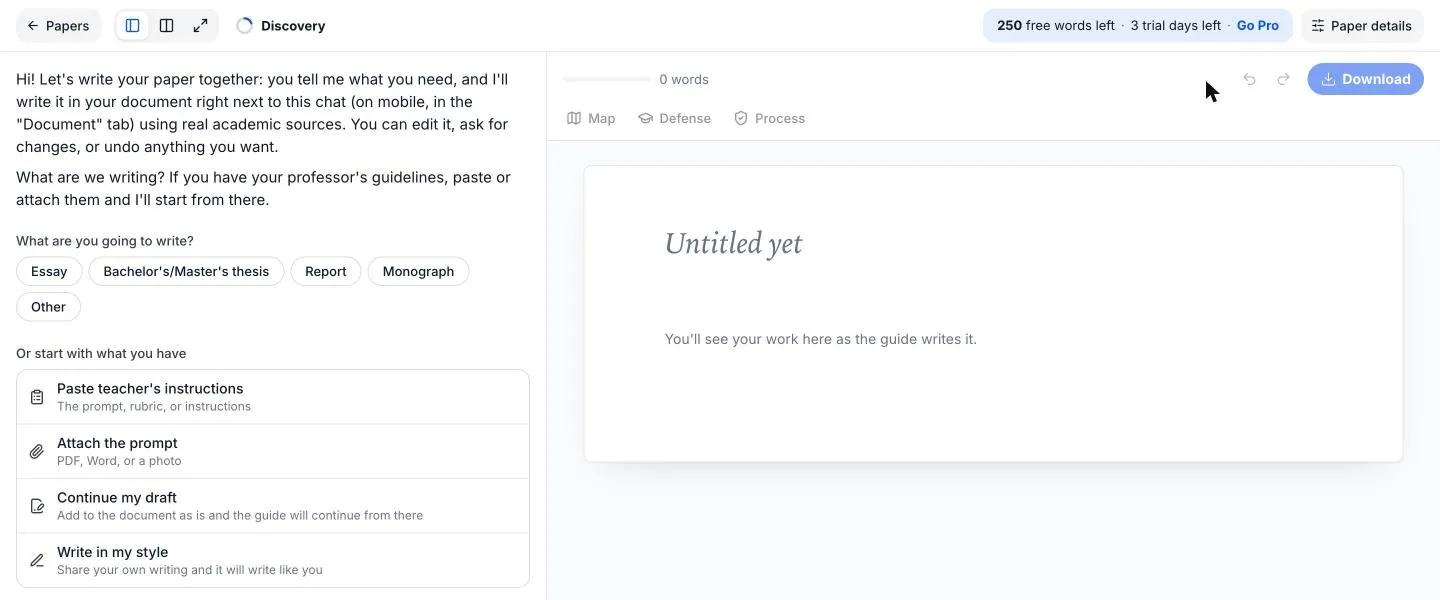
The core tool is Guided writing. You give it your assignment brief or rubric, it proposes a title and an outline, and then it drafts each section with you in a live document. Cites real academic sources from OpenAlex and Crossref, and you choose the referencing style: 10,851 citation styles (APA 7, MLA, Chicago, Harvard, IEEE, Vancouver, AMA, ABNT…).
A dissertation works the same way, one chapter at a time. Already have a draft? Imports your draft without rewriting it and carries on from where you left off.
Two features help you stand behind what you hand in:
- Check against the source opens the cited paper and looks for the passage that supports each citation. It comes with Aithor Pro and only works on papers with an open-access PDF.
- The Process report shows which parts you wrote yourself and how the paper came together, with a shareable link for your tutor on Aithor Pro.
Research
The Investigator answers a research question with scholarly papers and tells you how much the studies agree. It searches OpenAlex, an open index of research. Over 200 million scholarly works (OpenAlex). You’ll find it in the AI research assistant. If your project starts with what’s already been published, the literature review tool screens the studies and drafts the synthesis.
Studying
Study turns your material into things you can revise with. Study from a PDF, Word file, audio, up to 10 photos of your notes, a web page, a YouTube video, your own text or just a topic. Then choose from its 8 tools: Quiz, Open questions, Flashcards, Concept map, Infographic, Presentation, Podcast and Video. Everything is in the study tools.
When a paper is finished and you have to present or defend it, you can practise from inside the document. Defense mode: asks you about your paper one question at a time and tells you what to review.
Working on a text you already have
There is also an AI chat that reads your files, a paraphraser that can also proofread and translate, an AI detector that explains its reasoning sentence by sentence, and a humanizer. None of them can promise what your university’s detector will say.
Where you use it
Works in the browser on a computer or phone, at dashboard.aithor.io: nothing to install. Sign up with Google or with email and password.
There’s no separate app: on your phone you open the same address and get the same tools. Long writing sessions are easier on a laptop; a quick quiz on the bus works fine on a phone.
Languages
Interface in 9 languages: Spanish, English, Portuguese, French, Russian, Turkish, Arabic, Indonesian and Hindi. The app opens in your browser’s language.
In Guided writing, the guide replies in your language and the paper comes out in the language of your brief. In Study you choose the output language. Generates in Spanish (Spain, Latin America or Mexico for audio), English, Portuguese, French, German, Italian and Russian, or in the language of the source.
Pricing
One paid plan, Aithor Pro, with no lock-in: cancel anytime. The price depends on your country and is shown in your currency.
The free plan is a trial: its quotas do not renew. Use it to see how each tool works before you pay; it isn’t meant to get a whole paper done for free. The pricing page compares the two plans tool by tool.
What Aithor.io doesn’t do
- It doesn’t make decisions for you. The guide suggests; you choose what stays. Your argument and your conclusions are yours.
- It doesn’t invent your experience. If an assignment asks for a placement, a lab session or a personal reflection, that part has to come from you.
- The Process report isn’t a certificate. It measures what happened in the editor: it does not certify that no AI was used.
- It doesn’t replace your university’s rules. Each institution decides whether AI is allowed and how to acknowledge it. Our guide on how to disclose AI use is a good place to start.
Where to start
New to it? The how-to guide walks through one paper from brief to finished file, step by step. Or open Guided writing with the brief for your next assignment and see what it proposes.
Frequently asked questions
Is Aithor.io free?
You can start without paying, but the free plan is a trial. Each tool has an allowance that does not renew and a limit of its own. Depending on the tool, the result is cut short, can't be downloaded or comes in a shorter version. Full papers and downloads come with Aithor Pro. The pricing page lists the free allowance for every tool.
Is there an Aithor.io app?
Not one you install. Aithor.io runs in your browser, on a laptop or a phone, at dashboard.aithor.io. There is nothing to download and no Aithor.io app in the phone stores.
Which AI models does Aithor.io use?
It uses language models from Google and OpenAI, among others. Models change often, so we don't list versions. The sources in your paper don't come from the model's memory; they are looked up in scholarly databases such as OpenAlex and Crossref.
Will Aithor.io write my paper for me?
It writes with you, not instead of you. The guide suggests a title and an outline and drafts each section with you; you read it, change it or undo it, and you decide what stays. Check what you submit and follow your university's rules on AI use.
Who is Aithor.io for?
Undergraduate and graduate students who have essays, reports, dissertations or theses to write and exams to revise for.
Related
Sources
- OpenAlex: an open index of scholarly works. OurResearch. openalex.org/
- Crossref: metadata and DOI registration. Crossref. www.crossref.org/
Try it with your own paper
Try it on Aithor.io with the free plan, within its limits.
Start for free