AI for dissertation writing that works with you, not for you
Aithor.io works through your undergraduate or master's dissertation with you: it reads the brief, suggests a title and outline and drafts each section with you using real sources, but it never writes the whole thing in one go or decides what stays. Free: 3-day trial with 40 messages a day and about 250 words written by the guide per paper, no download; anything beyond that is cut off.
Sign up with Google or your email and start on the free plan, with its limits.
| Reads your brief from PDF, Word, PowerPoint, OpenDocument, text or photos (with OCR), up to 20 MB per file and 20 files per paper |
| Cites real academic sources from OpenAlex and Crossref |
| 10,851 citation styles (APA 7, MLA, Chicago, Harvard, IEEE, Vancouver, AMA, ABNT…) |
| With Aithor Pro you download Word, PDF or Markdown, with a title page, linked bibliography, footnotes and table of contents |
| Defense mode: asks you about your paper one question at a time and tells you what to review |
| It measures what happened in the editor: it does not certify that no AI was used |
| Free: 3-day trial with 40 messages a day and about 250 words written by the guide per paper, no download; anything beyond that is cut off |
How it works
- Upload your module handbook, dissertation brief or marking criteria.
- Pick a title and adjust the outline the guide suggests.
- Add your reading list; the guide finds more sources in OpenAlex and Crossref.
- Draft each chapter with the guide, a few sections at a time, and review as you go.
- Ask for a review of the whole draft and accept or reject each change.
- Download a Word file with title page and your referencing style (Aithor Pro).
- Rehearse your viva or presentation with questions about your own dissertation.
Who does what
Your dissertation is marked as your work, so the split needs to be clear from day one. Here is the one we suggest:
| Stage | Aithor.io does this | You decide or do this |
|---|---|---|
| Brief | Reads the handbook or criteria and picks up the word count, formatting and title page details | Check it has understood what is being asked |
| Topic and outline | Suggests titles and an outline with a word target for each section | Choose the angle and agree the outline with your supervisor |
| Sources | Finds real works in OpenAlex and Crossref and cites from their abstracts | Read the key sources and add the ones on your reading list |
| Drafting | Writes a few sections at a time | Keep what works, rewrite what does not sound like you and bring your own data |
| Review | Checks coherence, transitions, length or language and proposes changes | Accept or reject each change |
| Submission | With Aithor Pro, produces the Word file with title page, references and contents page | Proofread the final file and follow your university rules |
| Viva or presentation | Asks you questions about your dissertation and tells you what to revisit | Practise out loud and prepare your slides |
What it will never do is attribute experiences, data or findings to you that you haven’t given it. If your project involves interviews, a survey, a placement or lab work, that material comes from you.
What it looks like while you work
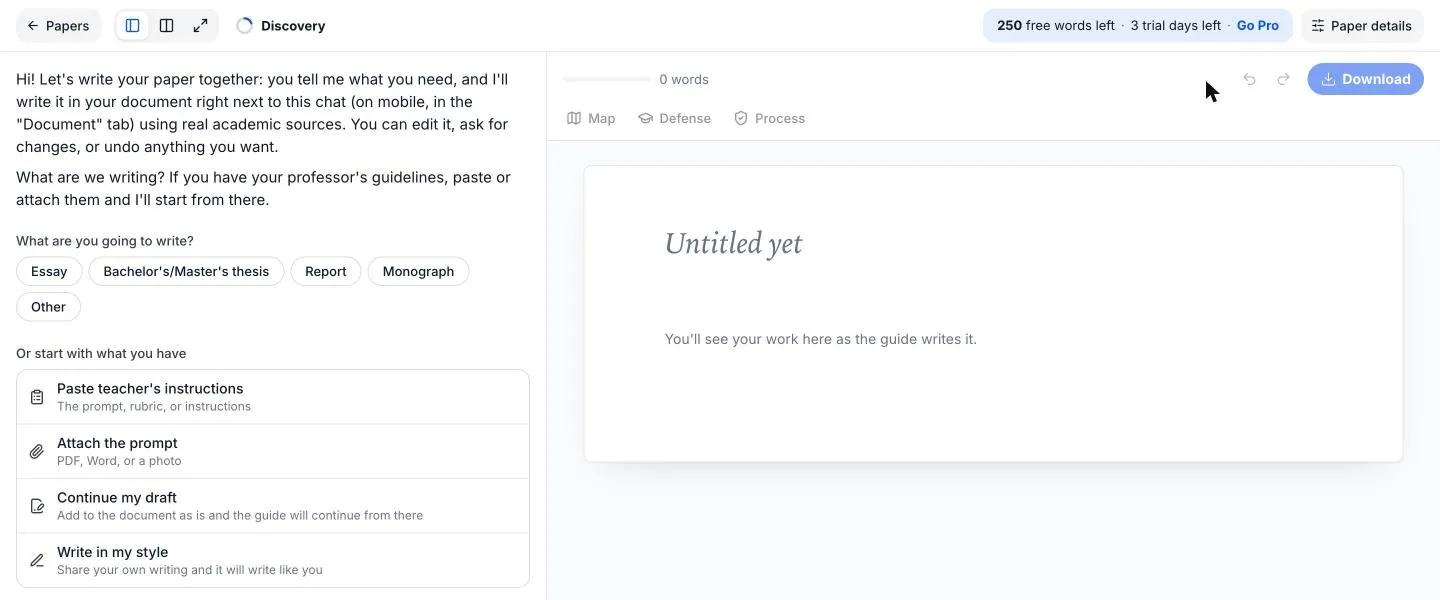
On screen, you talk to the guide on one side while your document grows on the other, and you can edit it at any point or undo changes just as you would in Word. At the start, you pick the type of paper or attach your module handbook, and the suggested outline then appears in the document. Halfway through, you have the chapter being drafted next to your source library. At the end, the download panel has the title page filled in and the referencing style you chose.
A typical dissertation structure
Every department sets its own in the handbook, and an empirical project looks different from a desk-based or literature-based one. This is the most common layout for an empirical dissertation:
| Chapter | What it needs to do | With Aithor.io |
|---|---|---|
| Abstract | The whole project in one paragraph, findings included | Last, once everything else exists |
| Introduction | Context, the problem, your aims or research questions and a roadmap | Introduction generator |
| Literature review | What is already known and the gap you address | AI literature review and theoretical framework |
| Methodology | What you did, with whom or with which data, and why | You write it; the guide helps you structure it |
| Findings or results | What you found, before interpreting it | Your data, with tables and charts |
| Discussion | What your findings mean against the literature | With real sources to compare against |
| Conclusion | Answers to your questions, limitations and further research | Conclusion generator |
| References | Every work you cited, in the required style | Built automatically |
In a literature-based dissertation, the methodology describes your search (databases, keywords, inclusion criteria) and the findings are your synthesis of the studies. The guide to writing a dissertation walks through both types.
Referencing styles you are likely to meet
Many UK departments use a version of Harvard, psychology and education usually ask for APA 7, health sciences often use Vancouver, engineering uses IEEE and some humanities departments prefer MHRA or Chicago. Always follow your handbook: departmental versions of Harvard differ in small ways.
In Aithor.io you pick the style in the paper’s Sources panel and can change it at any time: 10,851 citation styles (APA 7, MLA, Chicago, Harvard, IEEE, Vancouver, AMA, ABNT…). Before you submit, compare the first few references with your department’s style guide.
Showing how you wrote it
More supervisors now want to know how a dissertation was produced, not just read the result. The Process report sums it up in one panel. Shows how much you wrote, who wrote each part (typed, pasted, edited from the guide or from the guide) and how it was done (days, messages and edits). It measures what happened in the editor: it does not certify that no AI was used.
Don’t lean on AI detectors either, whether to accuse or to reassure yourself: a study that tested 14 detection tools, including two commercial systems widely used by universities, concluded they were neither accurate nor reliable [3].
If your university asks you to declare AI use, be specific: which tool, for which parts and how you checked what it suggested. The Russell Group principles say universities should make clear where generative AI is inappropriate and help students acknowledge their use where necessary [1], and the QAA has resources on keeping assessment sound with generative AI [2]. To see how rules differ between institutions, read what UK and US university policies say about AI in dissertations. There is a template in our guide on how to disclose AI use in an assignment.
Preparing for your viva or presentation
Defending a dissertation means explaining choices: why this question, this method, these sources. Defense mode: asks you about your paper one question at a time and tells you what to review. That way you find the weak spots before your examiners do.
For your slides, you can send the dissertation straight to Study and turn it into a presentation: Editable PowerPoint with speaker notes, PDF and 15 designs. The full process is in viva and presentation practice.
Planning your time
If you start about three months before the deadline, work in this order and send your supervisor something at the end of each stage:
- Weeks 1–2: read the handbook, choose a topic and narrow the question. Send a working title and your aims.
- Weeks 3–6: search and read, apply for ethics approval if you need it, and draft the literature review. Send the outline and the review.
- Weeks 7–10: methodology, data collection (or your search protocol), findings and discussion. Send a full draft.
- Weeks 11–12: introduction, conclusion and abstract, then formatting, references, your AI declaration and viva practice.
The introduction and abstract come near the end on purpose: it is much easier to introduce a project that already exists. For a week-by-week version with a downloadable template, see our dissertation timeline. For a ready-made skeleton in Word, use the dissertation outline template.
Aithor.io compared with a general AI chat
A general-purpose chatbot can help with a one-off question about your dissertation. What it doesn’t do by default is hold a long project together with its outline, sources and history. The table sets it out point by point.
| Criterion | Aithor.io | A generic AI chat |
|---|---|---|
| Reads the handbook or marking criteria you upload | Yes | Partly |
| Keeps the outline and the text in one document | Yes | No |
| Cites works that exist, from academic databases | Yes | Partly |
| Drafts in batches that you review | Yes | No |
| Asks for your data instead of inventing it | Yes | Partly |
| Report showing who wrote each part | Yes | No |
| Viva practice based on your own text | Yes | Partly |
Frequently asked questions
Can I use AI for my dissertation?
It depends on your university, and sometimes on your department or supervisor. Many allow AI for finding sources, planning and improving clarity as long as you declare it; others are stricter. Read your dissertation handbook first, and if it says nothing, ask your supervisor in writing.
How much AI is acceptable in a dissertation?
There is no single percentage that applies everywhere. Detection tools give estimates that can be wrong in both directions, so what matters is your university's policy and an honest declaration of how you used AI. If you're asked to show your work, the Process report sets out what you wrote yourself.
Will it write my whole dissertation?
No. The guide drafts a few sections at a time and you decide what stays, because you can edit any paragraph, ask for another version or undo what you don't want. When a section depends on something only you know (your data, your fieldwork, your placement), it asks you or leaves a marked gap for you to fill, rather than making it up.
I've already written part of it. Can I carry on from there?
Yes. Attach your draft as a Word file or paste it in. It goes into the document exactly as you wrote it, and the guide completes the outline and picks up where you stopped.
Does it work for a master's dissertation?
Yes, the workflow is the same as for an undergraduate one. At master's level, methodology and the discussion with the literature carry more weight, so budget extra time for your literature review and for checking the sources the guide cites.
Can it help with my methodology chapter?
It can help you structure the chapter and explain why a standard method suits your question, but the details of what you actually did (your sample, your instruments, your ethics approval) have to come from you. The guide asks for them, or leaves a marked gap, rather than inventing them.
Is it free?
You can try it for free, with a set number of messages and words written by the guide. The trial doesn't renew and doesn't include downloads; the full paper, the Word download and the downloadable report come with Aithor Pro.
Will Turnitin flag it?
Nobody can promise what a detector will flag, and Aithor.io isn't built to hide AI use. The honest route is to stay within your university's rules, declare what you did and be able to show your process.
Related
Sources
- Russell Group principles on the use of generative AI tools in education. Russell Group (2023). www.russellgroup.ac.uk/sites/default/files/2025-01/Russell%20Group%20principles%20on%20generative%20AI%20in%20education.pdf
- Assuring Academic Standards in the Age of AI. Quality Assurance Agency for Higher Education (QAA). www.qaa.ac.uk/sector-resources/generative-artificial-intelligence
- Testing of detection tools for AI-generated text. International Journal for Educational Integrity (2023). doi.org/10.1007/s40979-023-00146-z
Try it with your own paper
Try it on Aithor.io with the free plan, within its limits.
Start for free