An AI research assistant that reads the papers first
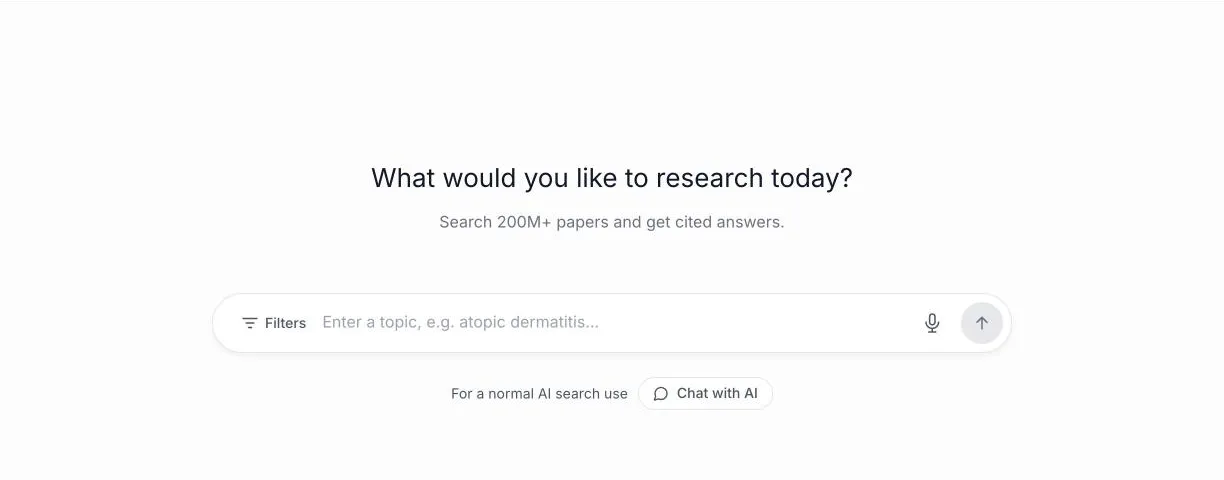
Aithor.io’s Investigator searches real scholarly papers and answers your question with numbered citations you can open and check, plus the level of consensus and the research gaps. Over 200 million scholarly works (OpenAlex). Free: 1 research query, with shortened answers and no copying or downloads.
Sign up with Google or your email and start on the free plan, with its limits.
| Over 200 million scholarly works (OpenAlex) |
| Answers with citations, level of consensus, study comparison, key concepts and research gaps, with filters by year and “PDF only” |
| Searches OpenAlex, Crossref and PubMed; with Aithor Pro, Google Scholar too |
| Free: 1 research query, with shortened answers and no copying or downloads |
| With Aithor Pro: full answers and references, copy with citations and Word download |
How it works
- Type your research question or topic in plain language.
- Answer the short questions it asks to narrow the scope (population, focus, type of study).
- Read the answer with numbered citations and open the papers in the reference list.
- Check the consensus, study comparison, key concepts and research gaps panels.
- Ask for more references, dig into one study, or filter by year and “PDF only”.
What happens between your question and the answer
Most AI tools answer the moment you hit enter. The Investigator does not, and that is deliberate. Here is what it does at each stage, and where your input makes the difference:
| Stage | What the Investigator does | Your move |
|---|---|---|
| First message | Restates your topic and asks a few scoping questions. It does not search yet | Answer them properly: who, which outcome, what kind of study |
| Search | Turns the conversation into a short academic query in English, since most indexed research is published in English, and runs it with your filters | Set year, sort order and “PDF only” before you start, or ask for them later in plain words |
| Answer | Writes a cited answer from the abstracts of the papers it found, in the language you wrote in, with panels underneath | Read the answer side by side with the reference list |
| Follow-up | Answers from the papers already on screen when it can, and tells you when they cannot answer your question | Ask “does this hold for older adults?” or “compare 2 and 5” |
| Digging in | Fetches the open-access PDF of the paper you pick and reads the full text rather than the abstract | Save this for the two or three papers your argument will rest on |
The panels, and what to do with each
Under each answer sits the reference list, with title, authors, year, journal, how often each paper has been cited and whether an open-access PDF exists. Around it are panels you can expand. They only appear when the papers support them.
| Panel | Use it to | Watch out for |
|---|---|---|
| Scientific consensus | Decide whether you can state a finding plainly or need to present it as contested. Levels: strong, moderate, mixed or limited | It reflects the papers in this search, not the whole field |
| Study comparison | See the main finding, the method and, where stated, the population of each paper side by side | Method labels come from abstracts; confirm them in the methods section |
| Key concepts | Pick up the field’s vocabulary for better searches and better writing | Short definitions can differ from the ones your module uses |
| Research gaps | Spot candidate questions for a project. The panel appears only when the evidence is incomplete | A gap in these papers may already be filled elsewhere |
| Key takeaways | Turn the reading into points for an essay plan or exam revision | They are a starting point, not your argument |
Each answer closes with related questions, so you can keep pulling the thread with one click.
Bear in mind that the consensus level is the AI’s estimate from the papers in that search. Use it to get your bearings, not as a substitute for a systematic review or a clinical guideline.
Turning a topic into a question it can search
Broad topics produce broad, shallow answers. The scoping questions push you towards something more specific, and you will get better results if you arrive with that already. Three examples:
| Starting topic | A question that works better |
|---|---|
| Study techniques | Does interleaved practice improve exam performance in undergraduate maths courses? |
| Burnout | Is remote or hybrid work associated with lower burnout among hospital nurses? |
| Home heating | What stops owners of older terraced houses from installing heat pumps? |
Each one names who is being studied, what is being looked at, which outcome matters and, where it helps, the setting. That is the same logic behind the PICO format many health and social science courses teach.
Once you have the first answer, carry on in your own words: “more references on this”, “tell me more about study 3”, “compare 1 and 4”, “PDF only” or “show me older studies”.
Real references, and what you still have to check
A language model answering from memory can produce references that look perfect and do not exist. When researchers asked a general-purpose chatbot to write short literature reviews, a substantial share of the citations it produced were fabricated or contained errors [3]. The Investigator works the other way round: it searches first and writes from what it found.
The papers come from OpenAlex, an open index of scholarly work run by a non-profit [1]. Over 200 million scholarly works (OpenAlex). To find free full texts it uses OpenAlex’s open-access data and, when you dig into a paper, Unpaywall, which locates legal open copies of articles [2].
So every reference is a real record you can open. What the tool cannot promise is that its summary of each paper is exact: a one-line finding can oversimplify, or blur two results together. If a paper is going into your bibliography, open it and find the sentence you are relying on. If you then write in Guided writing, Check against the source does that check citation by citation. With Aithor Pro, Check against the source gives the exact sentence and page for each citation, only for articles with an open-access PDF (OpenAlex or Unpaywall).
Using it for a dissertation
For a dissertation or a final-year project, the Investigator is best at the start, when you are scoping a topic and working out what has already been done.
- Find your question. Mixed or limited consensus and the gaps panel are where open questions live. The research gap finder page explains how to test a gap before you commit to it, and here is how to read the scientific consensus.
- Keep a record as you go. Note the date, the exact question and the filters each time you search, save the papers you keep in your reference manager with a line on why they matter, and write down the ones you rule out. It takes seconds now and saves an afternoon when you write up your search strategy.
- Know where it stops. A formal review needs a documented search in the databases of your field as well. Your supervisor or subject librarian can tell you which ones.
Next steps
If all you need is a list of sources for a topic or for one sentence in your draft, without a written answer, Sources and citations is quicker:
- Searches OpenAlex, Crossref and PubMed; with Aithor Pro, Google Scholar too.
- Free: 1 source search, with shortened answers.
- To organise what you found with inclusion criteria, a table of studies and a comparison matrix, use the AI literature review.
- To write the paper itself, one step at a time and with you in charge, use Guided writing, which cites real papers from OpenAlex and Crossref as you write.
- Before you submit, verify your citations against the original source.
| Criterion | Aithor.io | A generic AI chat |
|---|---|---|
| Searches an index of scholarly publications before it answers | Yes | Partly |
| Every citation points to a paper that exists and that you can open | Yes | Partly |
| Tells you how far the studies it found agree | Yes | Partly |
| Filters by year and by open-access PDF | Yes | No |
| Guarantees that each paper is summarised accurately | No | No |
Who it is for
Limits and responsible use
- It searches OpenAlex. A paper that is not indexed there will not show up.
- Answers are based mainly on abstracts; it reads the full text only when you dig into a study that has an open-access PDF.
- The consensus level is a reading of the papers found in that search, not a systematic review or a meta-analysis.
- It does not replace reading the papers you cite, and it does not check that each paper says exactly what the answer attributes to it.
- On the free plan the answer is shortened and you cannot copy or download it.
Frequently asked questions
Is the AI research assistant free?
You can try it on the free plan, but the answer is shortened and you cannot copy or download it. Aithor Pro gives you the full answer and references, copy with citations and a Word download. The exact free allowance is listed in the key facts on this page.
Are the papers it cites real?
Yes. Every reference comes from OpenAlex, an open index of scholarly publications, and you can open it from the list. What you still need to check is that the paper says what the answer attributes to it, especially if you are going to cite it.
Can it find free full-text PDFs?
Each reference shows whether an open-access PDF exists, and the “PDF only” filter keeps just those. If the paper you need is paywalled, try your university library, interlibrary loan or the authors themselves.
Does it replace Google Scholar or my library databases?
No, they do different jobs. A search engine or database gives you a list of results to read yourself, and your library’s databases are what a documented search, like the one behind a systematic review, has to use. The Investigator does a first pass over a set of papers and hands you a cited answer with consensus, a study comparison and gaps. Use it to get oriented, then search properly.
Does it work in languages other than English?
Yes. Ask in any language and the answer comes back in that language. The paper search itself runs in English, so most references will be English-language papers.
Can it summarise a paper I already have?
The Investigator works on the papers it finds, and it reads the full text of the ones that have an open-access PDF when you ask about them. To ask questions about a PDF you already have on your laptop, upload it to the AI chat instead.
Can I export the references?
With Aithor Pro you can copy the answer with its citations, copy just the bibliography, or download it as a Word file. Check the formatting against the style your course asks for, such as APA 7 or Harvard.
Can I trust the research gaps it suggests?
Treat them as leads. They come from the limitations and open questions in the papers from that search, not from the whole literature. Before you build a project on one, search for it directly and talk it through with your supervisor.
Related
Sources
- OpenAlex: A fully-open index of scholarly works, authors, venues, institutions, and concepts. arXiv (2022). arxiv.org/abs/2205.01833
- The state of OA: a large-scale analysis of the prevalence and impact of Open Access articles. PeerJ (2018). doi.org/10.7717/peerj.4375
- Fabrication and errors in the bibliographic citations generated by ChatGPT. Scientific Reports (2023). doi.org/10.1038/s41598-023-41032-5
Try it with your own paper
Try it on Aithor.io with the free plan, within its limits.
Start for free